


Zmodo
2.011.24K Reviews
App Specs
- Version
- 7.0.0.10
- Updated On
- License
- Free
- Downloads
- 1,000,000+
- Developer
- Zmodo Support
- Categories
- Lifestyle
- Platform
- Android
Screenshots
 Analysis by AppCompare
When a home has more than one person answering the door, checking on a room, or keeping an eye on a delivery, a shared camera app can either simplify things or create a tangle of alerts and account questions. I see Zmodo as most useful when the household already owns compatible Zmodo devices and wants one place to check them. It is a free lifestyle app from Zmodo Support, with a 3.1 average from around 20,000 ratings and more than a million installs. Those figures suggest a sizeable user base, but also a mixed reception, so I would treat it as a practical companion to specific hardware rather than a guaranteed fit for every smart home.
One household, several people checking in
A realistic use is a household where one person is out running errands while another is home expecting a parcel. The person away can check the live view or use two-way audio to speak to someone at the door, while the person at home does not need to relay every detail by text. That can be handy for deliveries, visitors, or a quick check on the house when plans change.
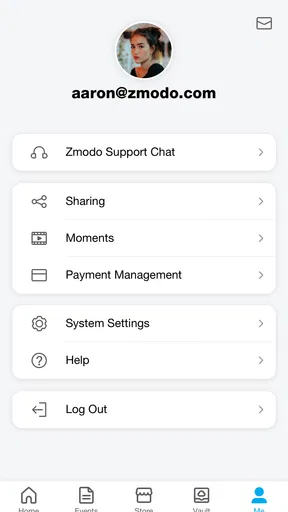
The sharing option is relevant here, but I would decide in advance who genuinely needs access. A shared view can be convenient; it also means more people may receive alerts or be able to see camera feeds. Before inviting a relative or housemate, agree on what the cameras cover and when it is appropriate to check them. That small conversation matters more than adding everyone automatically.
Account boundaries matter as much as setup
Getting devices connected is only one part of the job. In a shared home, it is worth agreeing on who creates and manages the account, who can add other people, and who will handle changes if a housemate moves out or a family member no longer needs access. I would avoid passing around the main login as a shortcut; use the app’s sharing option where it fits the household, and keep the account owner clear.
There is also a practical distinction between a camera that is used for occasional reassurance and one that becomes a constant source of monitoring. I would place devices with the people who live there in mind, not simply wherever a view seems convenient. A camera facing an entrance may help with deliveries, while a camera pointed at a private area can create distrust. The app cannot settle that household decision for you.
Alerts work best with a little planning
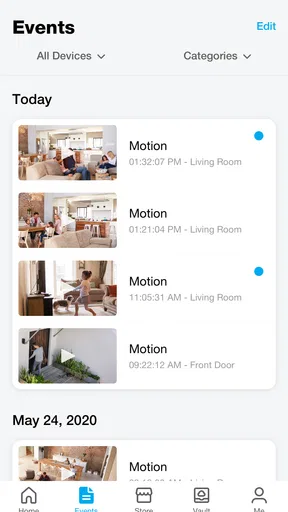
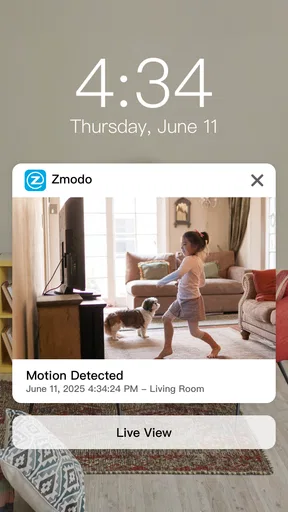
Motion notifications are most useful when they answer a question you actually have. If every passing shadow or routine movement produces a ping, people can start ignoring the alerts, which defeats the purpose. I would begin with a limited alert setup, then adjust it after seeing what the household considers meaningful. When several people share access, decide who is the primary person expected to respond; otherwise everyone may assume somebody else has already checked.
For a door camera, two-way audio can also prevent an unnecessary trip to the entrance. A person at work might tell a visitor where to leave a package, while someone at home can use the same feed to see who has arrived. Still, the feature depends on being available at the right moment, so I would not treat it as a substitute for a reliable plan with a delivery service or neighbor.
Worth Reading Before You Choose

EA SPORTS FC Mobile 26 Is a Bigger Football Game, but It Takes Time

Flipboard Shows What News Apps Must Do Beyond the Feed

Switching to Android Auto Means Rethinking Your Driving Routine

Google Calendar Makes a Crowded Week Easier to Manage

Ludo King Makes the Most of the Minutes Between Plans

Baby Panda World Brings Quick Play to Modern Phones, but Its Game Library Feels Busy
Age, trust, and everyday expectations
The app is rated for Everyone, which makes it suitable for a broad audience, but that label does not mean every household member should automatically manage a security camera. I would keep account decisions with a responsible adult and explain to children or visitors what devices are present and what they are used for. A home camera is not just another screen; people deserve to understand when a shared space is being monitored.
That trust question is especially important for guests, caregivers, or anyone who works in the home. I would tell them where cameras are placed and avoid using a shared feed as a silent way to supervise people. The app can make access easier, but a clear household agreement is what keeps that convenience from feeling intrusive.
Getting Started: Setting Up Zmodo
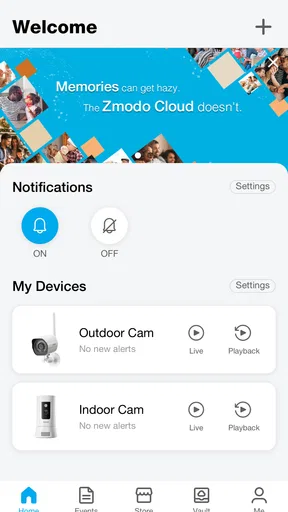
First things first, downloading and setting up Zmodo is a breeze. Available on both Android and iOS, you can grab it from the Google Play Store or Apple’s App Store. Once you've got it installed, launching the app greets you with a clean and intuitive interface. It’s like the app is saying, "Hey, I’m here to make your life easier!"
The setup process is fairly straightforward. You’ll need to create an account, and from there, you can start connecting your Zmodo devices. Whether it's cameras, doorbells, or smart lights, the app guides you step-by-step. It’s almost like having a tech-savvy buddy walk you through the process. The app uses QR codes to sync with devices, and in my experience, it was a smooth process without any hiccups.
Features That Stand Out
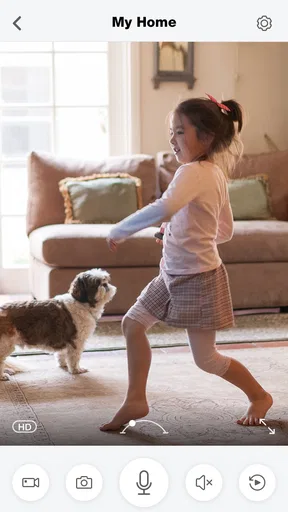
Now, let’s talk about what really makes Zmodo shine: its features. For starters, the live stream option is fantastic. You get a real-time view of your home, and the video quality is top-notch. Even in low light, the footage is surprisingly clear, thanks to night vision capabilities.
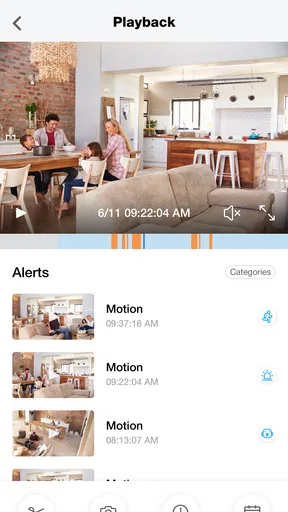
Another cool feature is the motion detection alerts. I found them to be incredibly reliable. Imagine sipping your coffee and getting a notification about someone at your door. It's like having a virtual doorman. The app also allows you to customize these alerts, so you’re not bombarded with notifications every time a leaf blows by.
- Cloud Storage
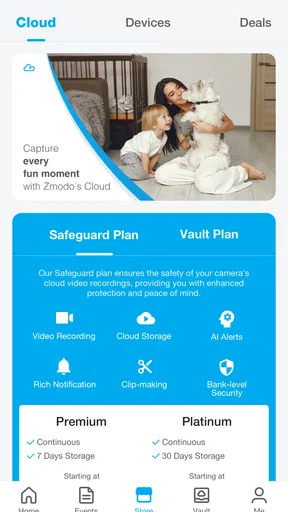
- One of the features I appreciate is the cloud storage option. It’s a lifesaver for those "just in case" moments when you need to review footage later. The app offers various plans, and you can choose one that fits your needs.
- Two-Way Audio
- This feature is great for those times when you need to communicate with someone at your door without actually being there. It’s clear, with minimal lag, making it practical for everyday use.
Plus, there’s a share feature that allows you to give access to family members. It’s perfect for when you’re on vacation, and you want to make sure your home is still in one piece.
User Experience: What’s It Like?
In terms of user experience, Zmodo really excels. The app is intuitive and user-friendly, which is crucial for something as important as home security. Navigating through the app is a breeze, and most importantly, it’s reliable. Nobody wants an app that crashes when you’re checking your security feed.
During my time with it, I didn’t encounter any major bugs or issues. Everything worked seamlessly, and it felt like the app was designed with the user in mind. The support section is also quite robust, offering FAQs and troubleshooting tips that are actually helpful. It’s like having a mini support team right in your pocket.
Choosing it over a mixed smart-home setup
The main trade-off is that Zmodo is centered on Zmodo connected products. If your household already has devices from several different brands and you want one dashboard to coordinate all of them, a broader smart-home platform may be a better starting point. On the other hand, if your cameras and related devices are already from Zmodo, using their own app keeps the day-to-day task direct: open the feed, check an alert, or speak through a device without trying to make separate systems work together.
I would also distinguish between a camera app and a complete security service. Live viewing and motion alerts can help you stay informed, but they do not by themselves guarantee that someone will respond to an event. For a household that needs a formal monitoring arrangement, a service designed around that need may be more appropriate. Zmodo makes more sense to me for people who want to check their own connected devices and make their own decisions.
Small habits that make the app more useful
One practical tip is to test the whole routine before relying on it while away: open the live stream, try two-way audio, and confirm that the people who need shared access can reach the right device. A successful installation is not quite the same as a useful household workflow. Testing together can reveal whether someone knows which camera to open or whether an alert is going to the person who is actually available.
I would also keep cloud storage decisions separate from basic app setup. The app is free to download, while in-app purchases range from about five dollars to nearly four hundred dollars per item. Since subscriptions or purchases affect the overall cost, I would check the option that applies to the devices and recording needs in the household before counting on saved footage. If live viewing is enough, a paid plan may not be necessary; if reviewing an event later matters, storage terms deserve attention before an incident occurs.
For an older phone, it is worth checking compatibility before planning a household installation: the current version is 7.0.0.8 and requires Android 5.0 or later. The app was released in 2015, so it has had time to establish itself, but the rating remains a useful reminder that experiences can vary. I would keep the app and device software current where possible and try the core tasks on the phone that will be used most often.
Who should choose it—and who should look elsewhere?
I would recommend considering it if you already use Zmodo cameras, doorbells, or smart lights, want mobile access to those devices, and are comfortable managing account access within your household. It is particularly suited to people who value a quick live check or occasional two-way conversation more than a complex automation system. The broad Everyone age rating makes the app accessible, but camera permissions and household rules still need adult judgement.
I would hesitate if you have not chosen hardware yet and are comparing whole-home systems, if you need all devices from different brands in one place, or if you expect the app alone to provide professional security response. I would also be cautious in a home where nobody is willing to own account management or agree on who can view feeds. The convenience of shared access depends on clear boundaries, not just the presence of a share button.
Final Thoughts: Is Zmodo Worth It?
So, is Zmodo worth downloading? In my opinion, absolutely. It’s a solid choice for anyone looking to enhance their home security setup. With its user-friendly design, reliable performance, and a suite of features that cater to both tech enthusiasts and beginners, it’s hard not to be impressed.
Sure, there are other options out there, but Zmodo seems to strike a balance between affordability and functionality. It’s like having a little piece of the future in your home, making you feel both secure and tech-savvy. So, if you’re in the market for a smart home security app, give Zmodo a shot. You might just find it’s the missing piece to your smart home puzzle.
My household verdict is a qualified yes: I would choose it when the devices are already part of the Zmodo setup and the people sharing access have agreed on sensible boundaries. The app is free to install, intended for Everyone, and its current version is 7.0.0.8; paid in-app items can still change the total cost of using the wider service. I would not buy hardware solely on the assumption that every app feature will suit every family. Instead, decide who manages the account, what alerts deserve attention, and whether cloud recording is worth paying for in your case.
In short, this is best treated as a focused way to check and manage compatible home devices, not a universal answer to security or smart-home coordination. If that matches what you need, its live view, adjustable motion alerts, audio, and sharing can make ordinary routines easier. If your priority is cross-brand control or a formal response service, I would compare those alternatives first. For the right household, though, keeping the workflow simple and the expectations clear is what makes the app worthwhile.
Pros
- Easy to set up and configure devices.
- User-friendly interface with clear navigation.
- Real-time alerts keep you informed instantly.
- Supports multiple camera views simultaneously.
- Compatible with both Android and iOS devices.
Cons
- Limited integration with third-party apps.
- Occasional connectivity issues reported.
- Cloud storage requires a subscription.
- Mobile app notifications can be delayed.
- Limited customization for alert settings.
FAQs for Zmodo
What is Zmodo, and how does it work?
Zmodo is a smart home security app that allows you to monitor and control your Zmodo devices remotely. By connecting to your Zmodo cameras, doorbells, and other security devices, the app provides real-time video streaming, alerts, and notifications. The app requires an internet connection and is compatible with both Android and iOS devices.
Is there a subscription fee for using Zmodo?
While the Zmodo app itself is free to download and use, accessing certain features like cloud storage for recorded footage requires a subscription. Various plans are available, offering different storage capacities and retention periods, allowing users to choose the option that best fits their needs.
Can Zmodo work with other smart home devices?
Zmodo products are primarily designed to be used within their ecosystem, but they may offer limited compatibility with other smart home devices through integrations like IFTTT. It's important to check the compatibility and integration options for specific devices within your smart home setup.
What kind of internet connection do I need for Zmodo?
Zmodo devices require a stable Wi-Fi connection to function properly, with a recommended minimum speed of 1 Mbps for smooth video streaming. For optimal performance, especially when using multiple devices or accessing high-definition video, a faster internet connection is advised.
How secure is the data and video footage in Zmodo?
Zmodo takes data security seriously, using encryption protocols to protect user data and video footage. However, users should ensure their home network is secure and regularly update their Zmodo app and devices to the latest firmware to maintain security against potential threats.


